# A tour of the admin panel
> Everything in your website's admin panel, menu by menu — so you always know where to find a setting.
Product: NijeesWeb website builder · Source: https://www.nijeesweb.com/docs/website/getting-started/admin-tour · Updated 2026-10-07
Your admin panel has a menu on the left and the screen you are working on to the right. On a small screen, the menu folds into icons — hover over an icon to see its name.

## Dashboard
The first screen after you sign in shows:
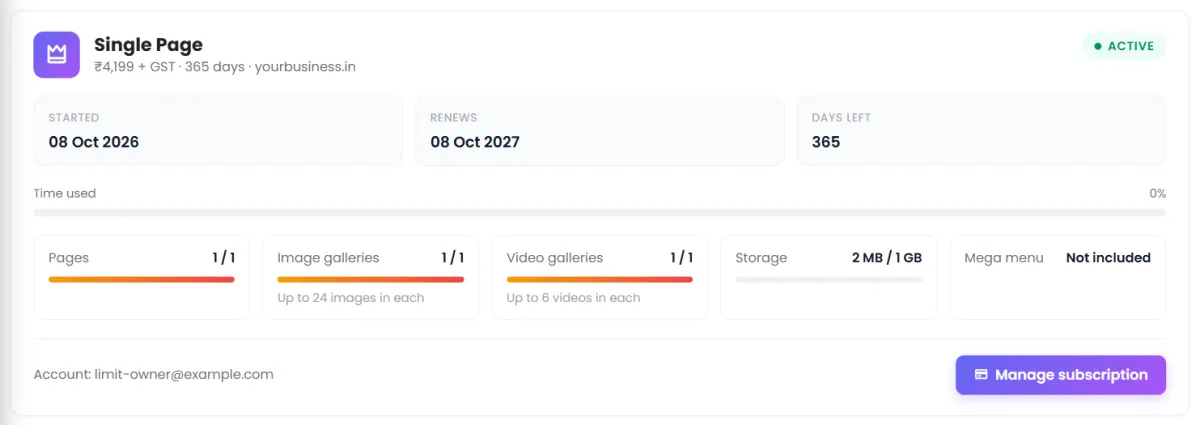
- **Your plan** — when it started, the **days left** and how much of the year is used, then **what your plan allows and how much you use**: pages, image galleries, video galleries and storage, and whether the mega menu is included, with any add-ons listed below. In the last 30 days a reminder appears; **Manage subscription** opens your NijeesWeb account in a new tab, where you renew, upgrade or buy add-ons.
- **Counts** of your pages, blog posts, blog categories, galleries, banners, testimonials, forms and form enquiries. Each card opens that section.
- **Recent Form Enquiries** — the latest messages from your website's forms.
- Shortcuts to **Manage Pages**, **Manage Blogs**, **Media**, **Settings** and **Visit Website**.
## The menu
| Menu | What it is for | Guide |
| --- | --- | --- |
| **Visit Website** | Opens your live site in a new tab. | — |
| **Dashboard** | The overview above. | — |
| **Info Pages** | Every page of your site. Add, reorder, open the builder, set page SEO. | [Pages](https://www.nijeesweb.com/docs/website/building-pages/pages) |
| **Media** › Image Gallery, Video Gallery, Banners, Media Library | Your pictures and videos, organised into galleries and banner sets. | [Media library](https://www.nijeesweb.com/docs/website/content/media-library) |
| **Testimonials** | Customer quotes to show on any page. | [Testimonials](https://www.nijeesweb.com/docs/website/content/testimonials) |
| **Accordions / FAQs** | Question-and-answer lists and expandable sections. | [Accordions](https://www.nijeesweb.com/docs/website/content/accordions) |
| **Blogs** › Blogs, Blog Categories | Articles, organised by category. | [Blog](https://www.nijeesweb.com/docs/website/content/blog) |
| **Forms** › Forms, Form Enquiries | Build forms; read what visitors send. | [Forms](https://www.nijeesweb.com/docs/website/content/forms) |
| **Layout** › Header Manager, Menu Links, Mega Menu, Footer Builder, Social Links | Everything around your pages. | [Header](https://www.nijeesweb.com/docs/website/header-footer/header) |
| **Design** › Theme, My Library, Website Themes, Theme Library, design styles, Import Designs | Colours, fonts, themes and ready-made styles. | [Theme](https://www.nijeesweb.com/docs/website/design/theme) |
| **Languages** › Languages & Detection, Translations | Publish in more than one language. | [Languages](https://www.nijeesweb.com/docs/website/languages/add-a-language) |
| **Settings** › General Settings, CSS & JS | Company details, logo, SEO defaults, business tools, custom code. | [General settings](https://www.nijeesweb.com/docs/website/settings/general-settings) |
| **Logout** | Sign out. | — |
## Saving, and never losing work
Every edit screen has a **save bar** fixed to the bottom of the window. It reads *All changes saved.* until you change something, then *Unsaved changes*, with two buttons:
- **Save changes** — or press Ctrl + S (⌘ + S on a Mac).
- **Discard** — or press Esc; you are asked to confirm first.
If you click a link or menu item with unsaved changes, a dialog asks what to do: **Save & leave** (Ctrl + S), **Yes, leave** (Y) to throw the changes away, or **No, stay here** (N). Closing the tab shows your browser's own *Leave site?* box instead.
> [!TIP]
> Keep a second tab open on your live site and refresh it after saving to see exactly what visitors see.
Next: work through the [launch checklist](https://www.nijeesweb.com/docs/website/getting-started/launch-checklist).