- Website builder
- Account & billing
- Add-ons
Add-ons — more pages, galleries or storage
Give one website more pages, galleries or storage than its plan — or the mega menu — without changing plan. What add-ons cost mid-year, how they renew, and how to stop one renewing.
An add-on gives one website more room than its plan includes — a few more pages, another gallery, more storage, or a feature such as the mega menu — for a yearly price. It is often cheaper than moving to a bigger plan when you only need a little more.
What you can add#
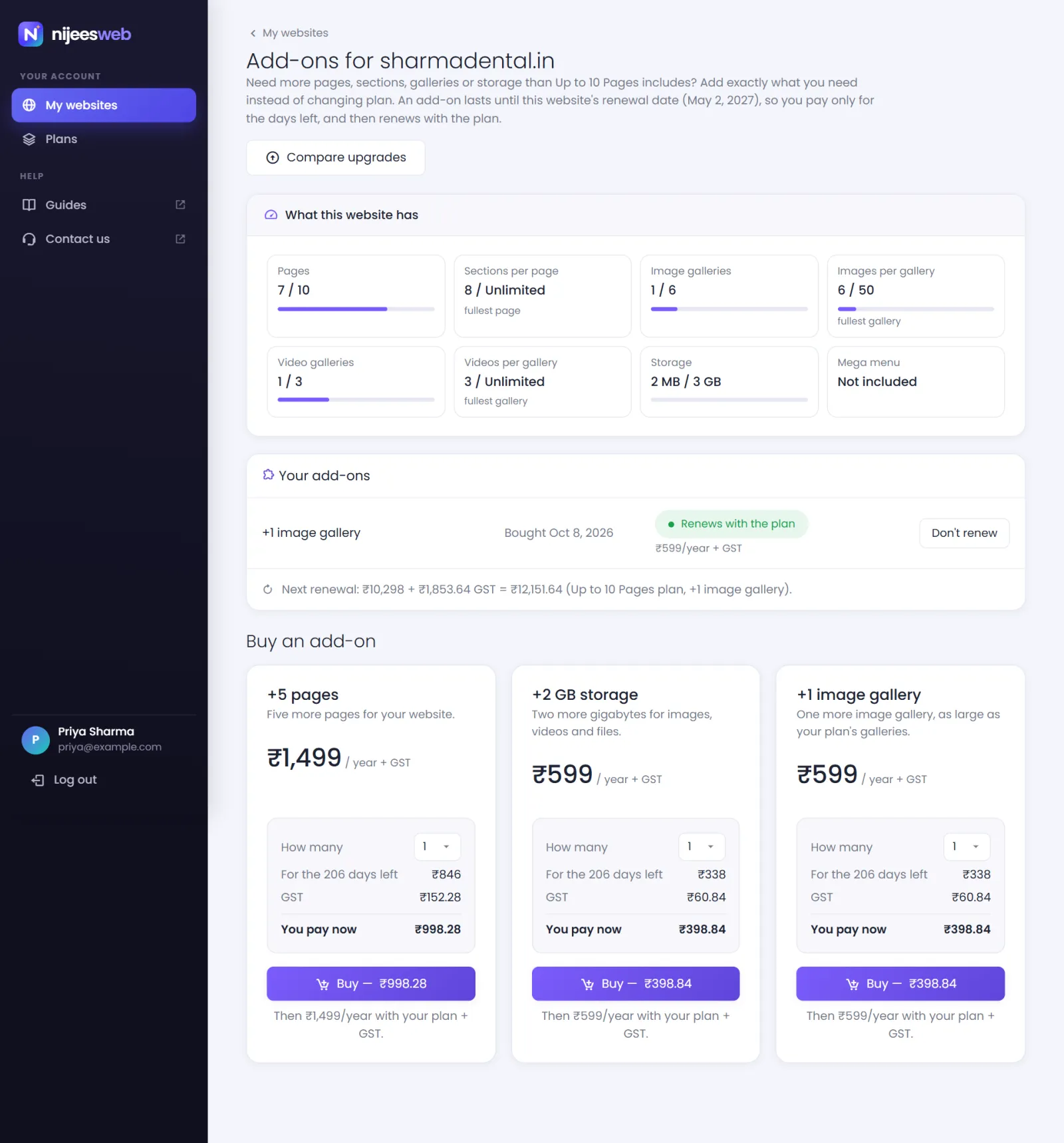
- +5 pages — ₹1,499 a year + GST. Five more pages for your website.
- +2 GB storage — ₹599 a year + GST. Two more gigabytes for images, videos and files.
- +1 image gallery — ₹599 a year + GST. One more image gallery, as large as your plan's galleries.
You can buy several of the same add-on: two +5 pages add ten pages. Prices are before tax; 18% GST is added at checkout.
What it costs#
An add-on runs until your website's renewal date, so you only pay for the days that are left:
You pay now = add-on's yearly price × number of add-ons × days left ÷ days in the year, plus GST
The add-ons page shows the exact amount for your website before you pay. From the next renewal, the add-on renews together with your plan at its yearly price.
Buy an add-on#
- Sign in to your account dashboard.
- On the website's card, select Add-ons.
- The page starts with What this website has — each limit and how much of it you use.
- Under Buy an add-on, choose How many on the add-on you want. The price for the days left updates as you choose.
- Select Buy — ₹… and pay on PhonePe's checkout.
The extra room is available in your website admin as soon as the payment is confirmed — there is nothing to switch on.
Stop an add-on renewing#
Under Your add-ons, each add-on says whether it Renews with the plan. Select Don't renew to leave it out of the next renewal: it stays until the renewal date, then ends. Select Renew with the plan to take it back.
When an add-on ends, nothing on your website is deleted. If the website then holds more than its plan allows — more pages than the plan includes, say — the first ones stay on and the rest are switched off until there is room again. You choose which stay on by their order; see When your website is over a limit.
Good to know#
- Add-ons can be bought while a website is active. An expired website must be renewed first.
- Upgrading keeps your add-ons. They add to the new plan's limits.
- Add-ons belong to one website. Your other websites are not affected.
- An add-on that adds a feature your plan already includes is not offered.
- Payments for add-ons are covered by the refund policy like any other payment.
Was this page helpful?
Something is missing — tell us