- Website builder
- Design & themes
- Website themes
Install a website theme
Install a complete ready-made website in one click, or take just its colours, header, footer or a page.
Design › Website Themes shows complete ready-made websites from the NijeesWeb library — the ones your plan includes. You can install a whole theme, or pick single pieces from it.
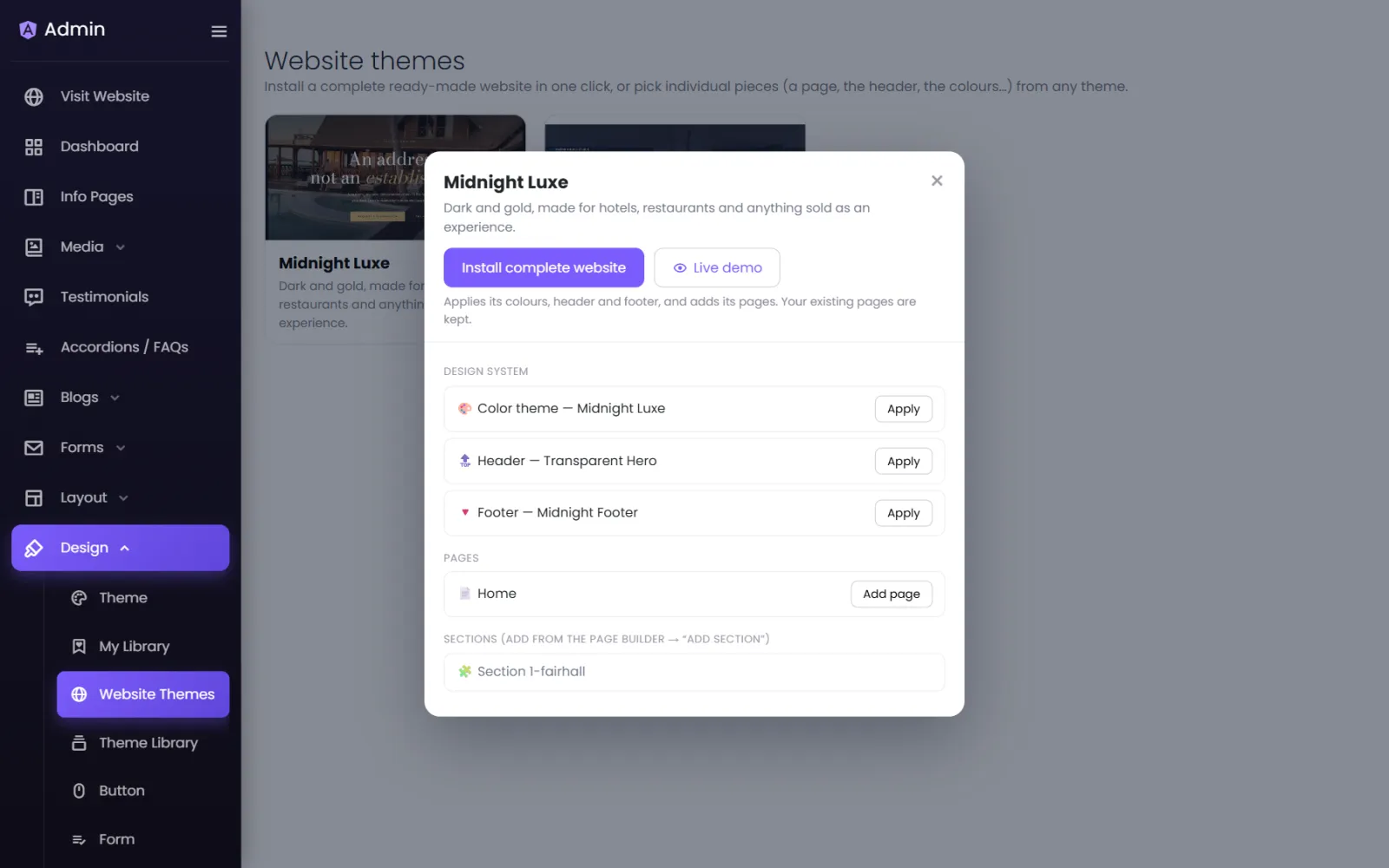
Preview a theme#
Select Live demo on a theme to open it, exactly as it would look, in a new tab.
Install the complete website#
Select Install complete website. This:
- applies the theme's colours (your Theme settings),
- replaces your header and footer with the theme's,
- adds the theme's pages to your site.
Your existing pages are kept — nothing is deleted. When it finishes you are asked whether to open the new pages in the builder.
Take just one piece#
Under each theme you can apply pieces separately:
- Design system → 🎨 Color theme — Apply to take only its colours and fonts.
- 🔝 Header — Apply to take only its header.
- 🔻 Footer — Apply to take only its footer.
- Pages — Add page next to any page to add just that one.
- Sections — add them from the page builder with + Add section, see Save and reuse sections.
"No website themes are available on your plan yet."#
Themes are released per plan. If none are listed, your plan has none yet — your starter website is still fully editable, and higher plans may include more themes.
Was this page helpful?
Something is missing — tell us