- Website builder
- Getting started
- Set up your website
Set up your website
Fill in the set-up page — website ID, domain, starting design and admin login — before you pay.
After you choose a plan, the Set up your website page asks for the few details we need to create your website. Everything except the domain and website ID can be changed later.
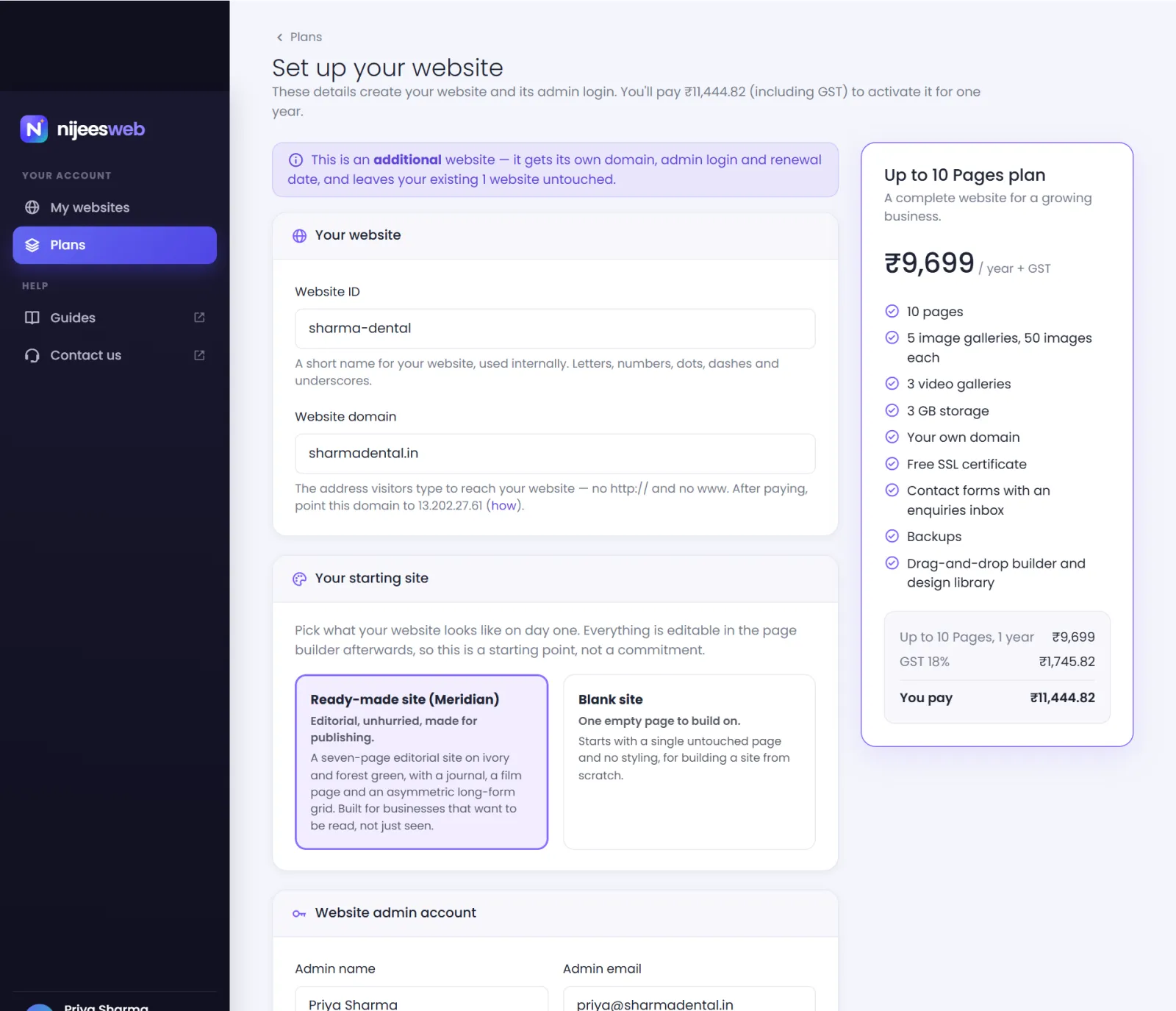
Website ID#
A short internal name for your website, such as sharma-dental. Visitors never see it; it identifies your website in our systems and in conversations with support.
- Use only letters, numbers, dots (.), dashes (-) and underscores (_) — no spaces.
- Up to 60 characters.
- It must be unique across NijeesWeb, so a generic word like
shopmay already be taken.
Website domain#
The address visitors will type to reach you, such as sharmadental.in.
- Type the bare domain: no
http://, nohttps://, nowww.and no slash at the end. - You must already own the domain. Buy it from any domain registrar first.
- A subdomain such as
book.sharmadental.inalso works.
Right after paying, you will connect the domain by pointing it to 13.202.27.61. You can do that before paying too — it does no harm.
Your starting site#
Choose what your website looks like on day one:
- Ready-made site (selected by default) — the complete designer-made website that comes with your plan: Lumen with the smallest plan, Meridian with the middle one, Obsidian with the largest. Every page, image, menu and contact form is already in place.
- A website theme — any complete theme from the NijeesWeb library that your plan includes, shown by name with the label Website theme.
- Blank site — one empty page with no styling, for people who want to build everything from scratch.
Nothing here is permanent. You can change every word, image and colour afterwards, and install other themes later from the admin panel. See Templates to preview the designs.
Website admin account#
This is the login for your website's admin panel — where you edit the site. It is separate from your NijeesWeb account.
- Admin name — shown in the admin panel. Pre-filled with your account name.
- Admin email — you sign in to your website with this. Pre-filled with your account email.
- Admin password and Confirm admin password — at least 6 characters, typed the same in both boxes.
Pay and activate#
Check the plan summary on the right, then select Pay & activate. You are taken to PhonePe's secure checkout — see Pay for your plan.
If the form shows an error#
| Message | Fix |
|---|---|
| The website ID may only contain letters, numbers, dots, dashes and underscores. | Remove spaces and other symbols. |
| The tenant id has already been taken. | Someone already uses that ID — add something unique, like your city. |
| Enter a bare domain such as mystore.example.com (no http:// and no trailing slash). | Delete http://, https:// and any / at the end. |
| That domain (or its www. alias) is already in use. | That domain already has a NijeesWeb website. If it is yours, renew or upgrade it from your dashboard instead. |
| That domain is reserved. | You entered a NijeesWeb address. Use your own domain. |
| The password confirmation does not match. | Type the same admin password in both boxes. |
| You have reached your limit of … websites. | Your account's website allowance is used up — contact support to raise it. |
All of these are explained in more detail in Set-up form errors.
Was this page helpful?
Something is missing — tell us