- Website builder
- SEO & AI search
- Site-wide SEO
Site-wide SEO settings
Set your website's default title, description and sharing image, and the business details search engines read.
Your site-wide SEO settings are the defaults every page uses unless it has its own. They live in Settings › General Settings.
Meta information#
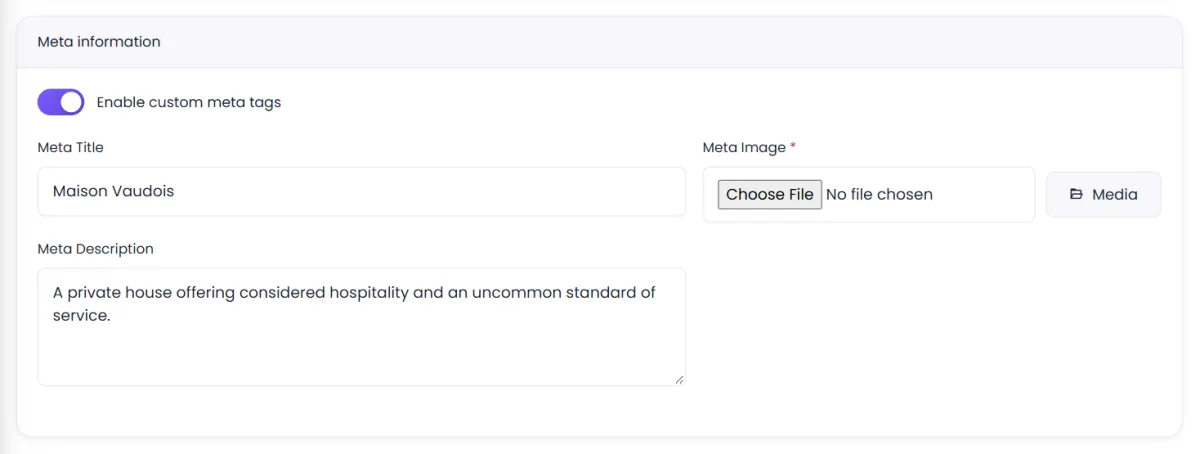
Under Meta information, switch on Enable custom meta tags, then fill in:
- Meta Title — your site's name in search results, such as Sharma Dental Clinic, Pune. Pages without their own title show Meta Title | Page title.
- Meta Description — one or two sentences describing your business, used by pages without their own description.
- Meta Image — the picture shown when your site is shared on WhatsApp, Facebook, LinkedIn or X. Use 1200 × 630 px, with your logo or a strong photo and little text.
Business details#
Under Business details — Company Name, Email, Mobile No. and Address. Besides appearing on your site, these feed the structured data that tells search engines who you are. Keep them exactly the same as on your Google Business Profile.
Favicon#
Under Branding, the Favicon Image is the small icon in the browser tab and in search results on phones. Use a square image, at least 192 × 192 px, that is recognisable at tiny sizes — usually your logo's symbol, not the full wordmark.
Per-page and per-post#
Each page and blog post can override these defaults — see Page SEO and Blog.
Was this page helpful?
Something is missing — tell us