- Website builder
- Reference
- Limits and file types
Limits and file types
What each plan allows — pages, galleries, storage — plus upload sizes, accepted file types, menu depth and other limits, in one place.
What your plan allows#
| Single Page | Up to 10 Pages | Up to 30 Pages | |
|---|---|---|---|
| Price a year | ₹4,199 + GST | ₹9,699 + GST | ₹19,999 + GST |
| Pages | 1 | 10 | 30 |
| Sections on each page | Unlimited | Unlimited | Unlimited |
| Image galleries | 1 | 5 | 15 |
| Images in each gallery | 24 | 50 | 100 |
| Video galleries | 1 | 3 | 10 |
| Videos in each gallery | 6 | Unlimited | Unlimited |
| Storage | 1 GB | 3 GB | 10 GB |
| Mega menu | — | — | ✓ |
Add-ons add to these numbers, and a website can be given its own limits by our team. Your website admin's Dashboard shows each limit and how much of it you use; the account dashboard shows the same on each website's card.
- Pages counts every page, active or inactive.
- Sections on each page is how many sections (rows) one page can have. Unlimited means exactly that.
- Images / videos in each gallery is per gallery: every image gallery can hold that many images.
- Storage is everything you upload — the media library, gallery pictures, videos, PDFs and logos. Uploads are counted at the size you upload them (images then shrink when they are converted to WebP).
- At a limit, nothing is deleted. The Add button shows a lock and says why, and you can make room or get more.
When your website is over a limit#
A website can hold more than its plan allows — after a move to a smaller plan, when an add-on ends, or when a limit is lowered. Nothing is deleted. In each list, the first ones stay on and the rest are switched off:
| Over the limit on | What happens |
|---|---|
| Pages | The pages after the first ones in Pages become inactive: visitors get page not found, and the header menu and footer leave out links to them. Your home page is always first, so it always stays on. |
| Sections on each page | The sections after the first ones on a page are not shown on your website. The builder keeps them, marked Hidden on your site. |
| Image or video galleries | The galleries after the first ones are switched off. |
| Images or videos in each gallery | In each gallery, the items after the first ones are switched off. |
| Storage | Nothing is switched off; new uploads are refused until there is room. |
| Mega menu | Your website shows the general menu instead. |
In the admin lists, something the plan switched off shows Off — plan limit with a lock, instead of Active or Inactive.
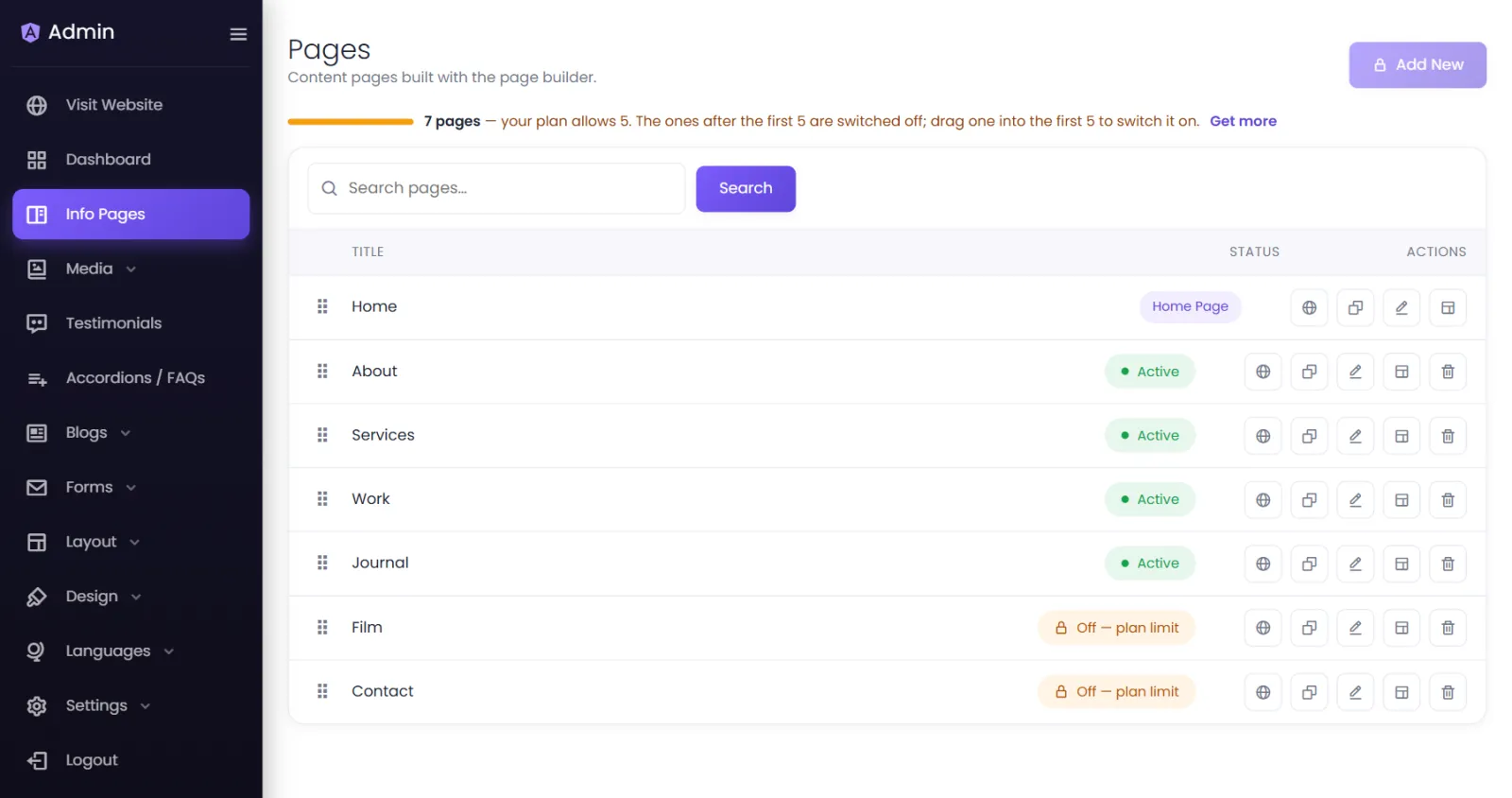
You choose which ones stay on. Drag the one you want higher, into the first ones of its list: it switches on, and the one it pushes past the limit switches off. Dragging a page to the very top also makes it your home page. While something is past the limit, its status button cannot switch it on — the message says how far up it has to go.
They come back on by themselves as soon as there is room — when you delete one, buy an add-on or upgrade. Only what the plan switched off comes back: anything you switched off yourself stays off.
Uploads#
| Where | Limit |
|---|---|
| Images in the Media Library | 4 MB per upload, for all selected images together |
| Video in the Media Library | 5 MB per video |
| PDF in the Media Library | 2 MB per PDF |
| An image uploaded inside the page builder | 2 MB |
| A video uploaded in the Single Video element | The server's upload limit |
Accepted file types#
| Kind | Types |
|---|---|
| Images | PNG, JPG/JPEG, WebP, GIF — converted to WebP on upload |
| Video | MP4, WebM, MOV, AVI, MKV |
| Documents |
Not accepted, for security: SVG and TIFF images, scripts, archives and executables. A file name must not contain extra dots (photo.final.jpg → photo-final.jpg).
Content#
| Item | Limit |
|---|---|
| Pages, galleries, storage | Set by your plan — see the table above |
| Columns in a row | 1 to 6 |
| Menu dropdown depth | 5 levels |
| Website ID | 60 characters: letters, numbers, dots, dashes, underscores |
| Admin password | At least 6 characters at set-up; at least 8 when reset |
| Languages | No limit |
Sign-in and forms#
| Item | Limit |
|---|---|
| Wrong website-admin passwords | 5, then a 15-minute pause |
| Account sign-in / sign-up attempts | 20 a minute from one connection |
| Checkout link | Valid for 15 minutes |
Was this page helpful?
Something is missing — tell us