- Online store builder
- Account & billing
- Automatic renewal
Automatic renewal
Have a store renew by itself every year with a saved payment method — how to switch it on and off, when you are charged and emailed, UPI AutoPay limits, and what happens if a payment fails.
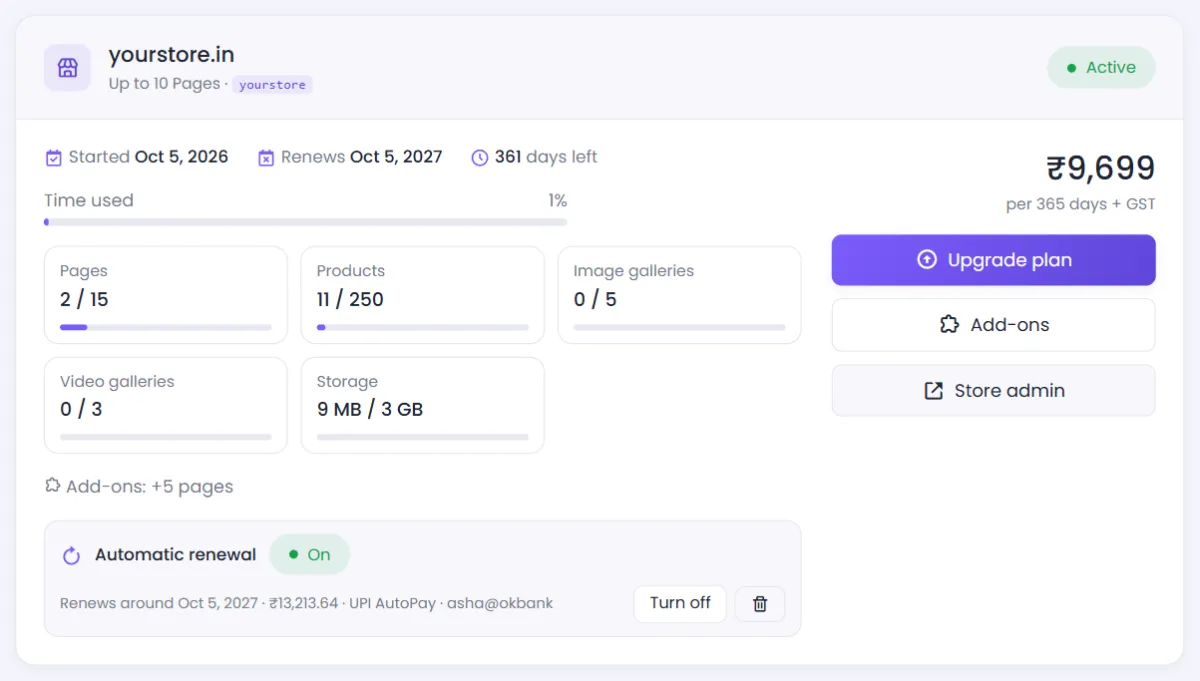
A store can renew by itself every year, so it never goes offline. Automatic renewal is off unless you switch it on, and each store has its own setting.
Switch it on#
- When you buy a plan: on the set-up page, switch on Renew automatically every year. Your payment method is saved with the payment service when you pay.
- Later, from your dashboard: in the store's Automatic renewal row, select Turn on. Choose how renewals are paid and save a payment method — nothing is charged now.
Card and bank details stay with the payment service. NijeesWeb keeps only its reference to them.
When you are charged#
- A week before the store's end date, we email you what will be charged, when, and to which payment method.
- About two days before the end date, the renewal is charged. With UPI AutoPay your UPI app tells you a day earlier, as banks require.
- You get an email once it has gone through.
The amount is the same as a renewal by hand: the plan's yearly price, plus each add-on set to renew, plus 18% GST. Your new year starts on the old end date, so charging a couple of days early costs you nothing.
Only the yearly renewal is charged automatically — never an upgrade or an add-on.
Paying with PhonePe: UPI AutoPay#
In India, automatic renewal through PhonePe uses UPI AutoPay: you approve a mandate once, in your UPI app. The rules come from NPCI and the RBI:
- It works with UPI — not cards or net banking.
- A single renewal can be at most ₹15,000. When a plan's yearly price with 18% GST is more than that, renew that store by hand.
- Your UPI app shows the mandate. You can pause or cancel it there at any time — that switches automatic renewal off.
Setting it up from the dashboard makes a ₹2 check on your UPI account, which your bank refunds.
If a payment fails#
We try again the next day, up to three times. If it still does not go through, we email you. Renew by hand from your dashboard — Renew now appears on the store's card in its last 30 days — or after the end date, to bring the store back online. Your products and orders are safe either way.
Switch it off#
In the store's Automatic renewal row, select Turn off. Nothing more is charged. The saved payment method is kept in case you switch it on again. To remove it, select the bin icon next to the switch — this also cancels a UPI AutoPay mandate.
Was this page helpful?
Something is missing — tell us