- Online store builder
- Orders & returns
- Orders list
Find and filter orders
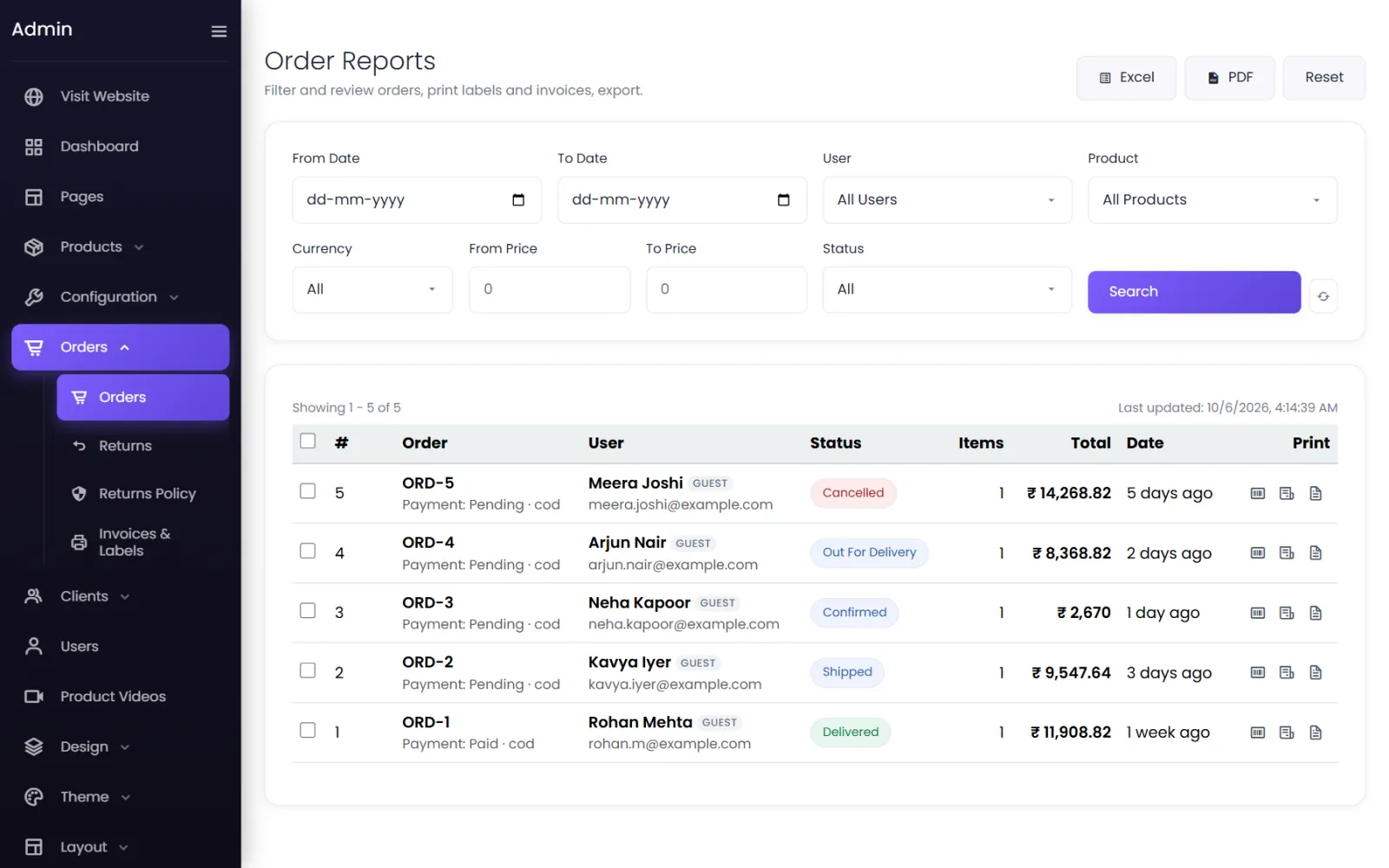
The orders screen — filter by date, customer, product, currency, price and status; select orders to print in bulk; export to Excel or PDF.
Orders → Orders opens Order Reports — your list of every order, with filters, bulk printing and export.
Reading the list#
Each row shows:
- # and Order — the order number, such as ORD-5, with the payment status and method underneath (Payment: Pending · cod).
- User — the customer's name and email. GUEST marks a customer who checked out without an account.
- Status — Pending, Confirmed, Shipped, Out for delivery, Delivered or Cancelled.
- Items, Total and Date (2 days ago).
- Print — buttons for this order's shipping label, tax invoice and delivery challan.
Select a row to open the order.
Filter#
| Filter | Shows |
|---|---|
| From Date / To Date | Orders placed in that range. |
| User | One customer's orders. |
| Product | Orders containing that product. |
| Currency | Orders in one currency. |
| From Price / To Price | Orders whose total is in that range. |
| Status | One status — including Processing and Returned. |
Select Search to apply, Reset to clear, and the refresh button to reload. Showing 1 – 5 of 5 and Last updated tell you what you are looking at.
New orders#
The store does not send you an email for new orders. Check the Dashboard (orders in the last 14 days, and Latest Orders) or this list. Keep the admin open in a browser tab on busy days and select refresh.
Bulk actions#
Tick orders (or Select this page), then:
- Print labels — shipping labels for all of them.
- Invoices — tax invoices.
- Challans — delivery challans.
- Clear — untick everything.
See Print and export.
Export#
Excel downloads the filtered orders as a workbook; PDF as a landscape report. See Print and export.
Catalogue stores#
A store in catalogue mode has Enquiries here instead. See Enquiries.
Was this page helpful?
Something is missing — tell us